Course Title: 2D AUTOCAD (Skill Development)
Course Duration: 2 Months (Part-Time)
Course Overview:
This course is designed for Indian students seeking to
acquire practical 2D drafting skills using AutoCAD software. It focuses on
industry-relevant concepts, such as plan, elevation, and section drawings,
while emphasizing the use of AutoCAD’s core tools. The course provides learners
with the knowledge and expertise needed to pursue a career as a draftsman, CAD
technician, or freelance designer in fields like architecture, civil
engineering, and mechanical engineering.
Course Objectives:
- Equip
students with essential 2D AutoCAD drafting skills for technical drawing
and design.
- Develop
proficiency in creating architectural, mechanical, and civil engineering
drawings.
- Enable
learners to independently produce detailed 2D plans, sections, and
elevations for self-employment or employment.
- Prepare
students to meet the demands of the construction, design, and
manufacturing industries.
Course Teaching Methodology:
- Interactive
Lectures: Comprehensive presentations on AutoCAD tools and techniques.
- Practical
Assignments: Hands-on exercises to create real-world drawings.
- Project-Based
Learning: Final project-based assessments to ensure skills are
effectively applied.
- Customized
Learning: Tailoring content to regional and student-specific needs.
- Mentorship
& Support: Continuous guidance and feedback throughout the course.
Importance for Learners in Career Growth and Self-Employment:
- Employment
Opportunities: Learners can work as CAD technicians, architectural
draftsmen, or join design firms.
- Freelance
& Contract Work: Students can start their own businesses or work
as freelancers offering drafting and technical drawing services.
- Skill
Enhancement: This certification provides recognition of AutoCAD
skills, boosting employability and self-confidence.
- Entrepreneurship:
With AutoCAD expertise, learners can serve local contractors, architects,
and engineering firms independently.
Syllabus
Week 1: Introduction to AutoCAD
- Overview
of AutoCAD interface and settings.
- Introduction
to AutoCAD’s fundamental drawing commands.
- Working
with coordinate systems, units, and scales.
- Practical
Task: Setting up a basic drawing file and navigating AutoCAD.
Week 2: Creating 2D Plans
- Topic:
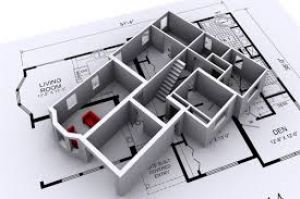
Drafting a 2D Floor Plan
- Drawing
walls, doors, windows, and furniture.
- Introduction
to the Draw Tool Bar: Line, Polyline, Circle, Rectangle, etc.
- Managing
layers for effective visualization and modification.
- Practical
Task: Create a simple residential or office floor plan.
Week 3: Elevation Drawing
- Topic:
Understanding and Drafting Elevations
- Key
principles of elevation drawings.
- Using
the Modify Tool Bar: Trim, Extend, Offset, Fillet, etc.
- Adding
dimensions and details to the elevation view.
- Practical
Task: Create the front elevation of a building.
Week 4: Section Plans
- Topic:
Developing Sectional Views
- Purpose
and importance of section drawings in construction.
- Using
dimension tools to ensure accurate measurements.
- Drawing
structural details such as walls, floors, and ceilings in section views.
- Practical
Task: Create a cross-sectional view of a house or room.
Week 5: Foundation Plan
- Topic:
Drafting a Foundation Layout
- Introduction
to foundation drawings and their importance.
- Working
with foundation details like footings and beams.
- Layer
management and annotations for clarity.
- Practical
Task: Create a foundation plan for a simple building.
Week 6: Center Line and Grid Plans
- Topic:
Drawing Center Lines for Structural Alignment
- Importance
of center lines in construction drawings.
- Tools
and methods for accurate center line drawing.
- Using
the Properties Tool Bar for customized line types and layers.
- Practical
Task: Create a center line plan for a building.
Week 7: Isometric & Schematic Drawings
- Topic:
Introduction to Isometric and Schematic Drawing
- Understanding
isometric projection in AutoCAD.
- Creating
simple 3D views using 2D plans.
- Drawing
and modifying isometric views using the toolbars.
- Practical
Task: Create an isometric drawing of a simple object.
Week 8: Final Project
- Topic:
Comprehensive Final Project
- Develop
a complete set of drawings (floor plan, elevation, section, foundation).
- Apply
all tools and techniques learned during the course.
- Present
the final design to peers and instructor for feedback.
- Practical
Task: Submit and present the final design project.
Tools & Features Covered:
- Draw
Tool Bar: Line, Polyline, Rectangle, Circle, Arc, etc.
- Modify
Tool Bar: Trim, Extend, Offset, Fillet, etc.
- Dimension
Tool Bar: Linear, Angular, Radius, Diameter, etc.
- Layer
Management: Creating and managing multiple layers for better
organization.
- Properties
Tool Bar: Customizing line types, colors, and other properties.
Assessment:
- Weekly
drawing assignments and review.
- Final
project submission with an evaluation by the instructor.
Please note that the course contents can be modified
based on the specific requirements of learners or location, ensuring that it
remains adaptable to the needs of the Indian student population.
Course Title: 2D AUTOCAD (Skill Development)
Course Duration: 2 Months (Part-Time)
Course Overview:
This course is designed for Indian students seeking to
acquire practical 2D drafting skills using AutoCAD software. It focuses on
industry-relevant concepts, such as plan, elevation, and section drawings,
while emphasizing the use of AutoCAD’s core tools. The course provides learners
with the knowledge and expertise needed to pursue a career as a draftsman, CAD
technician, or freelance designer in fields like architecture, civil
engineering, and mechanical engineering.
Course Objectives:
- Equip
students with essential 2D AutoCAD drafting skills for technical drawing
and design.
- Develop
proficiency in creating architectural, mechanical, and civil engineering
drawings.
- Enable
learners to independently produce detailed 2D plans, sections, and
elevations for self-employment or employment.
- Prepare
students to meet the demands of the construction, design, and
manufacturing industries.
Course Teaching Methodology:
- Interactive
Lectures: Comprehensive presentations on AutoCAD tools and techniques.
- Practical
Assignments: Hands-on exercises to create real-world drawings.
- Project-Based
Learning: Final project-based assessments to ensure skills are
effectively applied.
- Customized
Learning: Tailoring content to regional and student-specific needs.
- Mentorship
& Support: Continuous guidance and feedback throughout the course.
Importance for Learners in Career Growth and Self-Employment:
- Employment
Opportunities: Learners can work as CAD technicians, architectural
draftsmen, or join design firms.
- Freelance
& Contract Work: Students can start their own businesses or work
as freelancers offering drafting and technical drawing services.
- Skill
Enhancement: This certification provides recognition of AutoCAD
skills, boosting employability and self-confidence.
- Entrepreneurship:
With AutoCAD expertise, learners can serve local contractors, architects,
and engineering firms independently.
Syllabus
Week 1: Introduction to AutoCAD
- Overview
of AutoCAD interface and settings.
- Introduction
to AutoCAD’s fundamental drawing commands.
- Working
with coordinate systems, units, and scales.
- Practical
Task: Setting up a basic drawing file and navigating AutoCAD.
Week 2: Creating 2D Plans
- Topic:
Drafting a 2D Floor Plan
- Drawing
walls, doors, windows, and furniture.
- Introduction
to the Draw Tool Bar: Line, Polyline, Circle, Rectangle, etc.
- Managing
layers for effective visualization and modification.
- Practical
Task: Create a simple residential or office floor plan.
Week 3: Elevation Drawing
- Topic:
Understanding and Drafting Elevations
- Key
principles of elevation drawings.
- Using
the Modify Tool Bar: Trim, Extend, Offset, Fillet, etc.
- Adding
dimensions and details to the elevation view.
- Practical
Task: Create the front elevation of a building.
Week 4: Section Plans
- Topic:
Developing Sectional Views
- Purpose
and importance of section drawings in construction.
- Using
dimension tools to ensure accurate measurements.
- Drawing
structural details such as walls, floors, and ceilings in section views.
- Practical
Task: Create a cross-sectional view of a house or room.
Week 5: Foundation Plan
- Topic:
Drafting a Foundation Layout
- Introduction
to foundation drawings and their importance.
- Working
with foundation details like footings and beams.
- Layer
management and annotations for clarity.
- Practical
Task: Create a foundation plan for a simple building.
Week 6: Center Line and Grid Plans
- Topic:
Drawing Center Lines for Structural Alignment
- Importance
of center lines in construction drawings.
- Tools
and methods for accurate center line drawing.
- Using
the Properties Tool Bar for customized line types and layers.
- Practical
Task: Create a center line plan for a building.
Week 7: Isometric & Schematic Drawings
- Topic:
Introduction to Isometric and Schematic Drawing
- Understanding
isometric projection in AutoCAD.
- Creating
simple 3D views using 2D plans.
- Drawing
and modifying isometric views using the toolbars.
- Practical
Task: Create an isometric drawing of a simple object.
Week 8: Final Project
- Topic:
Comprehensive Final Project
- Develop
a complete set of drawings (floor plan, elevation, section, foundation).
- Apply
all tools and techniques learned during the course.
- Present
the final design to peers and instructor for feedback.
- Practical
Task: Submit and present the final design project.
Tools & Features Covered:
- Draw
Tool Bar: Line, Polyline, Rectangle, Circle, Arc, etc.
- Modify
Tool Bar: Trim, Extend, Offset, Fillet, etc.
- Dimension
Tool Bar: Linear, Angular, Radius, Diameter, etc.
- Layer
Management: Creating and managing multiple layers for better
organization.
- Properties
Tool Bar: Customizing line types, colors, and other properties.
Assessment:
- Weekly
drawing assignments and review.
- Final
project submission with an evaluation by the instructor.
Please note that the course contents can be modified
based on the specific requirements of learners or location, ensuring that it
remains adaptable to the needs of the Indian student population.