Course Title: Computer Application (Skill
Development)
Course Duration: 6 months (Part-time)
Course Objectives:
1.
To develop a strong foundation in computer concepts
and fundamentals.
2.
To provide practical skills in commonly used
computer applications.
3.
To familiarize students with graphic applications
for designing purposes.
4.
To introduce students to internet and its various
applications.
5.
To enable students to use computer applications for
self-employment opportunities.
6.
To empower students with the necessary skills for
career growth and self-employment in the Indian context.
Course Overview:
This course is designed to equip students with essential computer
application skills required for self-employment. It covers computer concepts
and fundamentals, common software applications, graphic design tools, and internet
applications. The course will be conducted part-time over a period of 6 months,
allowing students to balance their studies with other commitments.
Course Teaching Methodology:
1.
Lectures: In-class lectures will be conducted to
provide theoretical knowledge and concepts related to each topic.
2.
Practical Sessions: Students will engage in
hands-on exercises and projects to gain practical skills in using various
computer applications.
3.
Case Studies: Real-life case studies and examples
will be used to demonstrate the practical applications of computer skills in
self-employment.
4.
Group Discussions: Students will participate in
group discussions to share their experiences, ideas, and insights related to
computer applications for self-employment.
5.
Assignments: Regular assignments will be given to
assess students' understanding and reinforce their learning.
Importance for Learners in Career Growth and
Self-Employment:
1.
Increased employability: Acquiring computer
application skills enhances students' employability in various sectors,
including freelancing opportunities and small business ventures.
2.
Self-employment opportunities: This course equips
students with the necessary skills to start their own computer-based businesses
or provide services as independent professionals.
3.
Enhanced productivity: Proficiency in computer
applications helps students become more efficient and productive in their
personal and professional lives.
4.
Adaptability: In today's digital age, computer
application skills are crucial for individuals to adapt to rapidly evolving
technology trends.
5.
Competitive advantage: Knowledge of computer
applications sets learners apart from their peers and gives them a competitive
edge in the job market or self-employment endeavors.
Syllabus:
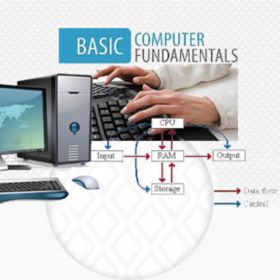
1) Computer Concept & Fundamentals
·
Introduction to computers and their components
·
Operating systems and file management
·
Computer networks and internet basics
·
Computer security and data privacy
2) Paint
·
Introduction to basic image editing and drawing
using Paint
·
Tools and features of Paint
·
Creating and modifying images
3) Notepad
·
Introduction to text editing with Notepad
·
Basic text formatting and manipulation
·
Creating and editing HTML files using Notepad
4) WordPad
·
Introduction to word processing with WordPad
·
Formatting documents, headers, and footers
·
Creating tables and managing documents
5) Basic Hardware & Software Installation
·
Hardware components and their functions
·
Software installation and troubleshooting
·
System maintenance and basic troubleshooting
techniques
6) MS Office Applications
·
MS Word
o Document
formatting and styles
o Inserting
tables, images, and graphics
o Mail
merge and document collaboration
·
MS Excel
o Spreadsheet
creation and formatting
o Basic
formulas and functions
o Data
analysis and visualization
·
MS PowerPoint
o Creating
engaging presentations
o Slide
layouts, animations, and transitions
o Presenting
and sharing slideshows
7) Graphic Applications
·
Photoshop
o Introduction
to image editing and manipulation
o Layers,
filters, and effects
o Creating
and editing graphics
·
Premier
o Video
editing basics
o Adding
effects, transitions, and titles
o Exporting
and sharing videos
·
InDesign
o Desktop
publishing fundamentals
o Layout
design and typography
o Creating
professional documents
·
Corel Draw
o Vector
graphics creation and editing
o Drawing
tools and effects
o Designing
logos and illustrations
8) Internet & Its Applications
·
Internet Introduction and Applications
·
Browsers
·
Understanding Web Applications
·
Web Search, Live Videos, Downloading, Uploading
·
Web Forms
·
Email & Its Usage
·
Introduction to Google Applications
Note: The syllabus can be modified based on the requirements of learners
or specific regional needs.
Course Title: Computer Application (Skill
Development)
Course Duration: 6 months (Part-time)
Course Objectives:
1.
To develop a strong foundation in computer concepts
and fundamentals.
2.
To provide practical skills in commonly used
computer applications.
3.
To familiarize students with graphic applications
for designing purposes.
4.
To introduce students to internet and its various
applications.
5.
To enable students to use computer applications for
self-employment opportunities.
6.
To empower students with the necessary skills for
career growth and self-employment in the Indian context.
Course Overview:
This course is designed to equip students with essential computer
application skills required for self-employment. It covers computer concepts
and fundamentals, common software applications, graphic design tools, and internet
applications. The course will be conducted part-time over a period of 6 months,
allowing students to balance their studies with other commitments.
Course Teaching Methodology:
1.
Lectures: In-class lectures will be conducted to
provide theoretical knowledge and concepts related to each topic.
2.
Practical Sessions: Students will engage in
hands-on exercises and projects to gain practical skills in using various
computer applications.
3.
Case Studies: Real-life case studies and examples
will be used to demonstrate the practical applications of computer skills in
self-employment.
4.
Group Discussions: Students will participate in
group discussions to share their experiences, ideas, and insights related to
computer applications for self-employment.
5.
Assignments: Regular assignments will be given to
assess students' understanding and reinforce their learning.
Importance for Learners in Career Growth and
Self-Employment:
1.
Increased employability: Acquiring computer
application skills enhances students' employability in various sectors,
including freelancing opportunities and small business ventures.
2.
Self-employment opportunities: This course equips
students with the necessary skills to start their own computer-based businesses
or provide services as independent professionals.
3.
Enhanced productivity: Proficiency in computer
applications helps students become more efficient and productive in their
personal and professional lives.
4.
Adaptability: In today's digital age, computer
application skills are crucial for individuals to adapt to rapidly evolving
technology trends.
5.
Competitive advantage: Knowledge of computer
applications sets learners apart from their peers and gives them a competitive
edge in the job market or self-employment endeavors.
Syllabus:
1) Computer Concept & Fundamentals
·
Introduction to computers and their components
·
Operating systems and file management
·
Computer networks and internet basics
·
Computer security and data privacy
2) Paint
·
Introduction to basic image editing and drawing
using Paint
·
Tools and features of Paint
·
Creating and modifying images
3) Notepad
·
Introduction to text editing with Notepad
·
Basic text formatting and manipulation
·
Creating and editing HTML files using Notepad
4) WordPad
·
Introduction to word processing with WordPad
·
Formatting documents, headers, and footers
·
Creating tables and managing documents
5) Basic Hardware & Software Installation
·
Hardware components and their functions
·
Software installation and troubleshooting
·
System maintenance and basic troubleshooting
techniques
6) MS Office Applications
·
MS Word
o Document
formatting and styles
o Inserting
tables, images, and graphics
o Mail
merge and document collaboration
·
MS Excel
o Spreadsheet
creation and formatting
o Basic
formulas and functions
o Data
analysis and visualization
·
MS PowerPoint
o Creating
engaging presentations
o Slide
layouts, animations, and transitions
o Presenting
and sharing slideshows
7) Graphic Applications
·
Photoshop
o Introduction
to image editing and manipulation
o Layers,
filters, and effects
o Creating
and editing graphics
·
Premier
o Video
editing basics
o Adding
effects, transitions, and titles
o Exporting
and sharing videos
·
InDesign
o Desktop
publishing fundamentals
o Layout
design and typography
o Creating
professional documents
·
Corel Draw
o Vector
graphics creation and editing
o Drawing
tools and effects
o Designing
logos and illustrations
8) Internet & Its Applications
·
Internet Introduction and Applications
·
Browsers
·
Understanding Web Applications
·
Web Search, Live Videos, Downloading, Uploading
·
Web Forms
·
Email & Its Usage
·
Introduction to Google Applications
Note: The syllabus can be modified based on the requirements of learners
or specific regional needs.