Course Title: SketchUp (Skill Development Course)
Course Duration: 3 Months (Part-Time)
Course Objectives:
- To provide students with a comprehensive understanding of SketchUp software and its applications in 3D modeling and design.
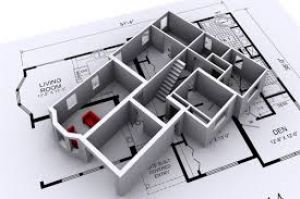
- To develop practical skills in creating 3D models of architectural spaces and objects.
- To enable students to use SketchUp for self-employment opportunities in architectural visualization and design.
- To prepare students for roles in architecture, interior design, and 3D modeling.
Course Overview:
Module 1: Introduction to SketchUp
- Overview of SketchUp and Its Uses
- Installation and Setup
- Interface Tour: Toolbars and Panels
- Camera Controls: Pan, Zoom, and Orbit
Module 2: Basic Tools and Modeling
- Basic Drawing Tools: Rectangle, Circle, Pencil, and more
- Selection Techniques
- Push/Pull Tool for Extrusions
- Creating Groups and Components
- Transformation Tools: Move, Rotate, Copy, Array, Offset
- Applying Paint and Materials
Module 3: Architectural Modeling Practice
- Creating Walls and Floors
- Adding Windows and Doors
- Constructing Frames and Tables
Module 4: Openings and Materials
- Working with Openings in Walls
- Creating and Editing Materials
- Scaling and Rotating Materials
Module 5: Advanced Modeling and Warehouse
- Downloading Models from the SketchUp 3D Warehouse
- Editing Downloaded Models
- Working with Groups and Components
- Understanding Scaling and Editing
Module 6: Object Placement and Section Plane
- Placing Objects Precisely
- Locking to Axes
- Using Reference Points
- Creating Section Planes for Elevations and Floor Plans
Module 7: Layouts and Presentation
- Preparing Views for Layouts
- Sending Views to Layouts
- Positioning, Sizing, and Moving Views
- Working with Scenes
- Adding Dimensions and Labels
- Using Styles in Layout
- Creating a Title Block
Module 8: Basic Rendering
- Introduction to Basic Rendering in SketchUp
- Understanding Light and Shade
- Directional Lights, Ambient Lights, and General Lights
- Rendering Test and Adjustments
Module 9: Structured Modeling Phase
- Creating Floors, Walls, Storefronts
- Designing Doorways and Window Frames
- Adding Stairs, Columns, and Rails
Module 10: Detailing Phase
- Creating Furniture: Tables, Counters
- Adding Rugs, Picture Frames, and Posters
- Placing Light Fixtures and Accessories
Module 11: Lighting Phase
- Designing Lighting Layouts
- Using Different Types of Lights: Directional, Ambient, General, and Accent
- Testing Renders and Making Adjustments
Module 12: Rendering Phase
- Fine-Tuning Lighting
- Editing Materials
- Utilizing VRay Material Effects
- Camera Positioning and Render Settings
Module 13: Presentation Phase
- Creating Views for Layouts
- Setting Up Layouts: Image Hierarchy and Scaling
- Inserting Renderings
- Adding Dimensions, Labels, and Title Blocks
- Presentation Tips
Module 14: Final Project - Interior Space - Bedroom
- Creating a Room with Specific Dimensions
- Adding Walls, Doorways, and Windows
- Designing and Furnishing the Bedroom
- Applying Lighting and Materials
Course Teaching Methodology:
- Classroom Lectures: Theoretical concepts will be explained through classroom lectures.
- Hands-On Labs: Practical exercises and real-world modeling projects.
- Group Discussions: Collaborative activities and discussions on design principles.
- Guest Lectures: Industry experts may be invited to share insights and experiences.
- Mentorship: Guidance on self-employment opportunities and career pathways in architectural design and 3D modeling.
Importance for Learners in Career Growth and Self-Employment:
- SketchUp proficiency is highly valued in architecture and interior design industries.
- Graduates can work as freelance 3D modelers, architectural visualization specialists, or offer design services for self-employment.
- SketchUp skills are essential for career growth in architectural and 3D modeling professions.
Note: The course contents can be adapted based on the specific requirements of learners or location, ensuring flexibility to cater to different student backgrounds and regional needs.
This three-month syllabus aims to equip Indian students with essential SketchUp skills, preparing them for self-employment and a successful career in architectural design and 3D modeling.
Course Title: SketchUp (Skill Development Course)
Course Duration: 3 Months (Part-Time)
Course Objectives:
- To provide students with a comprehensive understanding of SketchUp software and its applications in 3D modeling and design.
- To develop practical skills in creating 3D models of architectural spaces and objects.
- To enable students to use SketchUp for self-employment opportunities in architectural visualization and design.
- To prepare students for roles in architecture, interior design, and 3D modeling.
Course Overview:
Module 1: Introduction to SketchUp
- Overview of SketchUp and Its Uses
- Installation and Setup
- Interface Tour: Toolbars and Panels
- Camera Controls: Pan, Zoom, and Orbit
Module 2: Basic Tools and Modeling
- Basic Drawing Tools: Rectangle, Circle, Pencil, and more
- Selection Techniques
- Push/Pull Tool for Extrusions
- Creating Groups and Components
- Transformation Tools: Move, Rotate, Copy, Array, Offset
- Applying Paint and Materials
Module 3: Architectural Modeling Practice
- Creating Walls and Floors
- Adding Windows and Doors
- Constructing Frames and Tables
Module 4: Openings and Materials
- Working with Openings in Walls
- Creating and Editing Materials
- Scaling and Rotating Materials
Module 5: Advanced Modeling and Warehouse
- Downloading Models from the SketchUp 3D Warehouse
- Editing Downloaded Models
- Working with Groups and Components
- Understanding Scaling and Editing
Module 6: Object Placement and Section Plane
- Placing Objects Precisely
- Locking to Axes
- Using Reference Points
- Creating Section Planes for Elevations and Floor Plans
Module 7: Layouts and Presentation
- Preparing Views for Layouts
- Sending Views to Layouts
- Positioning, Sizing, and Moving Views
- Working with Scenes
- Adding Dimensions and Labels
- Using Styles in Layout
- Creating a Title Block
Module 8: Basic Rendering
- Introduction to Basic Rendering in SketchUp
- Understanding Light and Shade
- Directional Lights, Ambient Lights, and General Lights
- Rendering Test and Adjustments
Module 9: Structured Modeling Phase
- Creating Floors, Walls, Storefronts
- Designing Doorways and Window Frames
- Adding Stairs, Columns, and Rails
Module 10: Detailing Phase
- Creating Furniture: Tables, Counters
- Adding Rugs, Picture Frames, and Posters
- Placing Light Fixtures and Accessories
Module 11: Lighting Phase
- Designing Lighting Layouts
- Using Different Types of Lights: Directional, Ambient, General, and Accent
- Testing Renders and Making Adjustments
Module 12: Rendering Phase
- Fine-Tuning Lighting
- Editing Materials
- Utilizing VRay Material Effects
- Camera Positioning and Render Settings
Module 13: Presentation Phase
- Creating Views for Layouts
- Setting Up Layouts: Image Hierarchy and Scaling
- Inserting Renderings
- Adding Dimensions, Labels, and Title Blocks
- Presentation Tips
Module 14: Final Project - Interior Space - Bedroom
- Creating a Room with Specific Dimensions
- Adding Walls, Doorways, and Windows
- Designing and Furnishing the Bedroom
- Applying Lighting and Materials
Course Teaching Methodology:
- Classroom Lectures: Theoretical concepts will be explained through classroom lectures.
- Hands-On Labs: Practical exercises and real-world modeling projects.
- Group Discussions: Collaborative activities and discussions on design principles.
- Guest Lectures: Industry experts may be invited to share insights and experiences.
- Mentorship: Guidance on self-employment opportunities and career pathways in architectural design and 3D modeling.
Importance for Learners in Career Growth and Self-Employment:
- SketchUp proficiency is highly valued in architecture and interior design industries.
- Graduates can work as freelance 3D modelers, architectural visualization specialists, or offer design services for self-employment.
- SketchUp skills are essential for career growth in architectural and 3D modeling professions.
Note: The course contents can be adapted based on the specific requirements of learners or location, ensuring flexibility to cater to different student backgrounds and regional needs.
This three-month syllabus aims to equip Indian students with essential SketchUp skills, preparing them for self-employment and a successful career in architectural design and 3D modeling.